The best pet camera with treat dispenser no subscription is one where live view, two-way audio, and treat tossing still work after any free trial—and where video history is either local (microSD or built-in storage) or clearly optional paid cloud. In 2026, that means reading the listing for “no subscription needed” language on core features, not marketing that hides history and AI alerts behind a mandatory plan. Start with models that publish treat-size limits, then verify stock and the exact SKU before you buy.
Alan is the owner of two dogs. Editorial note: We may earn a commission from qualifying Amazon purchases (tag smartpetcomfo-20). Full disclosure at the end. Treat tossing is enrichment and remote check-in—not a medical treatment for separation-related distress.
What does “no subscription” mean on a treat-tossing pet camera?
Takeaway: Core see / talk / toss should work forever after purchase; paid plans should only add extras.
“No subscription” is not one technical standard. On treat-dispensing cams it usually means one of three setups:
- Standalone core forever: Live view, speaker/mic, treat toss, and basic bark/meow or motion alerts stay free. Optional plans add cloud history or richer AI (common on Furbo’s “No Subscription Needed” SKUs).
- Local-first storage: Clips save to built-in flash or a microSD card so you never need cloud history for everyday review (eufy-style and many budget cams).
- Thin free cloud + paid upgrade: A short free clip window exists, but multi-day searchable history sits behind Care / Nanny-style plans (common on Petcube when you want archives).
If your shopping job is “check in, talk, toss a treat, maybe replay today,” you can stay plan-free. If you need weeks of searchable cloud events after a theft or dispute, budget for a plan—or pick a camera with robust local recording and accept the physical-card tradeoffs.
Feature checklist: verify these before you buy
Takeaway: Write down which jobs must work on day one without a card on file.
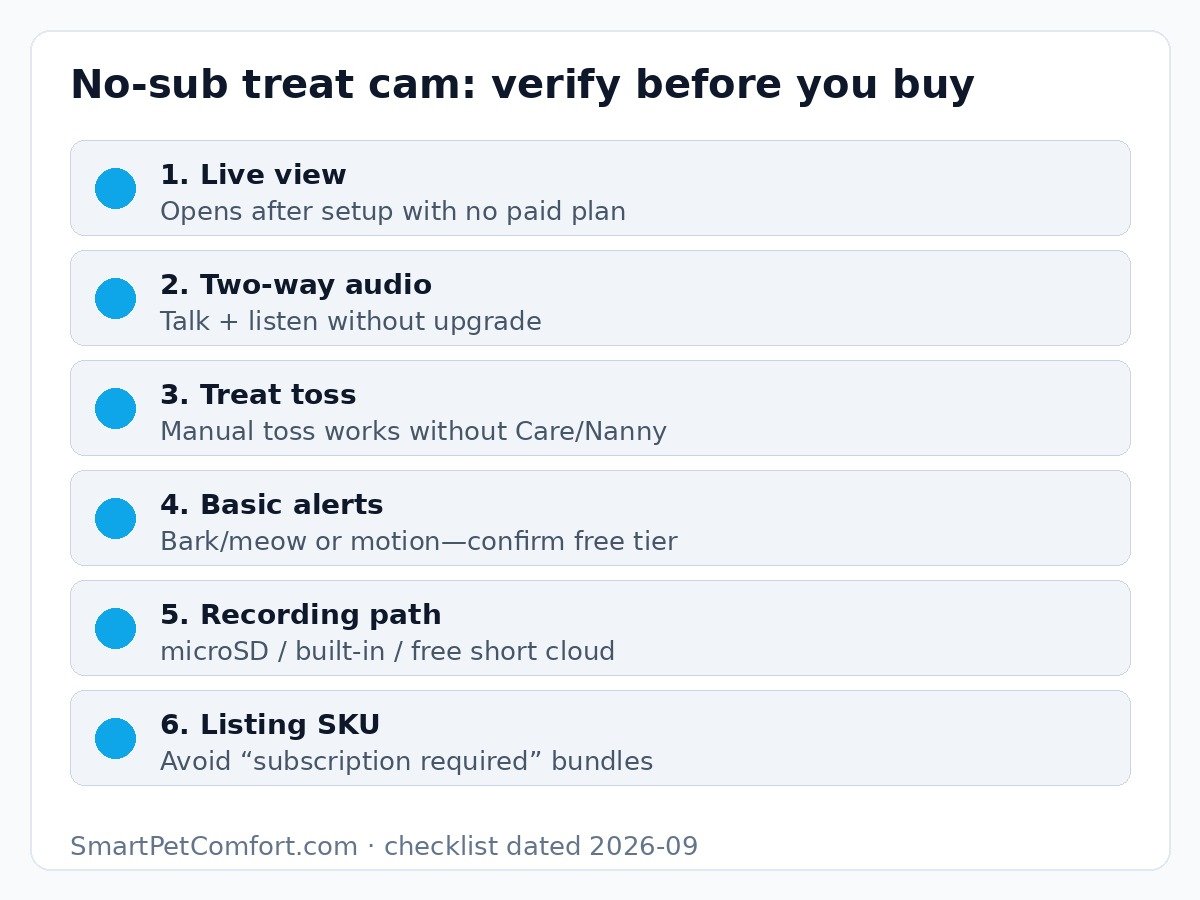
| Feature | Why it matters without a plan | What to verify (2026) |
|---|---|---|
| Live view | Primary job for most owners | App name; 2.4 vs 5 GHz Wi-Fi; typical delay |
| Two-way audio | Talk-down / listen for barking | Works without Care/Nanny; volume notes |
| Treat toss | The reason you skipped a plain cam | Manual toss free; treat size chart; hopper capacity |
| Basic alerts | Know when to open the app | Bark/meow or motion free vs AI-only paid |
| Recording path | Playback without rent | microSD max, built-in GB, or free clip days |
| SKU type | Avoid mandatory bundles | Title says “No Subscription Needed” / standalone—not “subscription required” |
| Privacy | Camera is a mic in your home | Unique password, MFA, firmware updates |
Treat size, jam risk, and cleaning
Takeaway: Most “broken” treat cams are wrong treat shape—not dead motors.
Treat-dispensing cameras fail in predictable ways when owners load crumbly, sticky, oversized, or flat treats. Round, dry training treats sized to the maker’s chart jam less. Soft chews and irregular freeze-dried pieces jam more. Clean the chute on a schedule; grease and dust turn into paste.
| Model (verified ASINs 2026-09-23) | Treat guidance from listings | Hopper / notes |
|---|---|---|
| Furbo 360° no-sub (B09GDQZLD1) | Adjustable treat size in app; round dry treats | Full-size tosser; brand-name fling distance |
| Petcube Bites 2 Lite (B08XXKJGKH) | Dry crunchy treats; sizing insert small/med/large | ~1.5 lb container—largest of these three |
| SKYMEE Petalk AI II (B0BSKX51KY) | Dual trays ~4–11 mm and ~11–17 mm (listing) | Drop/dispense style + schedule options |
If your pet startles at the toss sound, start with the shortest distance, fewer tosses, and pair the sound with calm praise when you are home. Constant treat spam can create begging at the camera and extra calories—use it as a sparse cue, not a remote meal plan.
Local storage vs free cloud vs optional paid plans
Takeaway: Match storage to how you review footage—not to the flashiest AI demo video.
Local microSD or built-in flash
Local storage keeps monthly cost near zero and keeps clips in your home. Tradeoffs: cards fail, fill, and leave with a stolen camera unless you also back up selectively. Budget cams such as SKYMEE emphasize TF/microSD recording; some premium no-sub designs (historically eufy D605) use built-in encrypted flash with no card slot.
Free short cloud windows
A free 24-hour cycle or limited event previews can be enough if you only scrub “what happened before dinner.” It is a weak fit for week-long travel archives. Note retention days and whether downloads require an upgrade.
Optional paid plans (Furbo Nanny, Petcube Care, and peers)
Paid tiers still make sense when you want off-site history, richer AI behavior labels, or multi-camera advanced alerts. For this article’s audience, optionality is the rule: you should be able to refuse the plan and still open live view, talk, and toss. Furbo’s help docs for standalone models state that live view, two-way audio, treat tossing, and basic bark/meow alerts remain free without Furbo Nanny. Petcube’s own FAQ states Bites cameras work out of the box without Care—Care adds history and smart alerts.
Dogs vs cats: when a treat cam helps
Takeaway: Tossers shine for food-motivated dogs; many cats prefer quieter fixed cams.
Dogs often learn the toss cue quickly and will orient to the camera. Cats may ignore audio, startle at the launcher, or treat the hopper as a puzzle to tip. If your cat mainly needs quiet monitoring of a feeder station or doorway, a plain no-subscription indoor cam (see our best pet cameras without subscription guide) is often the better buy. Choose a treat cam for cats only when they already like tossed dry treats and you can use a short, quiet toss setting.
A camera helps you observe pacing, ignored food, or door scratching. It does not diagnose medical issues or “cure” separation-related behavior. Use footage as notes for a veterinarian or qualified trainer when distress is intense, destructive, or escalating.
Best pet cameras with treat dispenser (no mandatory subscription)
Takeaway: Three in-stock 2026-09 picks covering brand-name core-free, large hopper, and budget local recording.
| Pick | Best for | No-sub angle | Watch-outs |
|---|---|---|---|
| Furbo 360° (standalone) | Overall see/talk/toss | Listing: core features, no subscription required | Nanny AI/history optional; 2.4 GHz Wi-Fi |
| Petcube Bites 2 Lite | Large treat capacity | Live + toss without Care | History/smart alerts lean on Care; fixed view |
| SKYMEE Petalk AI II | Budget + TF recording | App control without monthly fee claim | Smaller review base; setup quirks reported |
Amazon picks (verified in stock 2026-09-23)
Prices move. Confirm the SKU title still says core features work without a mandatory plan, and re-check treat-size notes on the live page.
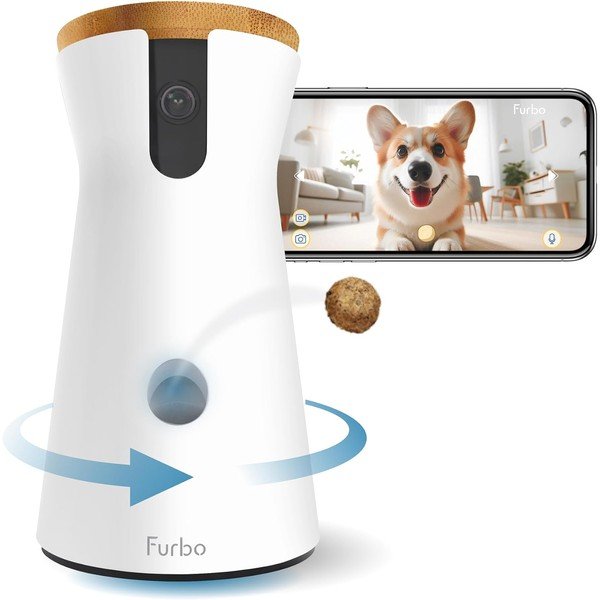
Furbo 360° Dog Camera (No Subscription Needed SKU)
Best for: Overall treat-tossing monitor with clear standalone core features
1080p live view, 360° rotation, two-way audio, barking alerts, and treat tossing are positioned as included without a mandatory plan on this SKU. Furbo Nanny (AI alerts, cloud history, and extras) is optional after a trial. Stick to round dry treats and expect 2.4 GHz Wi-Fi only.
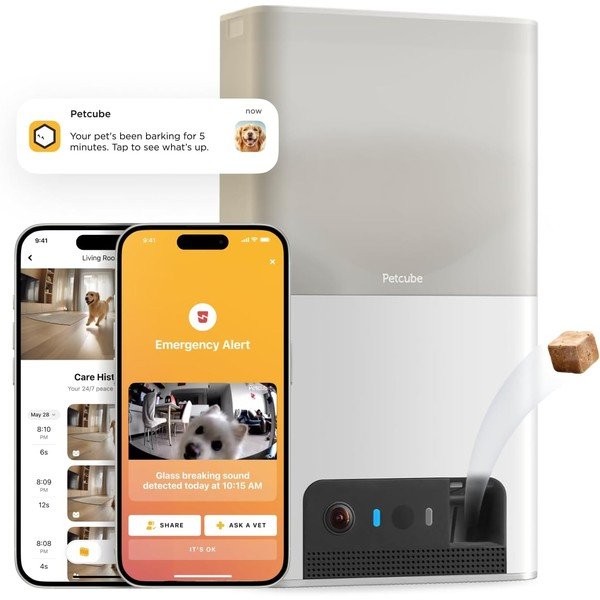
Petcube Bites 2 Lite
Best for: Large treat hopper and scheduled tosses
1080p live view, night vision, two-way audio, and a ~1.5 lb dishwasher-safe treat container with short/medium/long toss. Petcube states cameras work without a subscription; Petcube Care is optional for video history and richer smart alerts. Fixed wide view (no pan)—place it carefully. Avoid Care-bundled ASINs if your goal is plan-optional shopping.
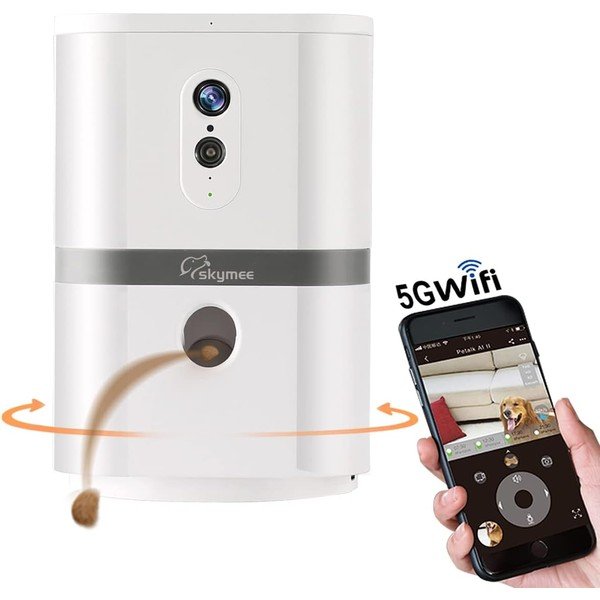
SKYMEE Petalk AI II
Best for: Budget treat cam with TF/microSD-style local recording
1080p camera, 180° pan, two-way audio, dual treat trays, motion alerts, and day/night TF recording when a card is installed (card sold separately). Listing emphasizes app control without a monthly fee and supports 2.4 & 5 GHz Wi-Fi. Expect a thinner review base and occasional setup friction—good when price and local recording matter more than brand polish.
Furbo 360 vs Petcube Bites 2 Lite vs SKYMEE Petalk AI II
Takeaway: Pick Furbo for polished 360° toss, Petcube for hopper capacity, SKYMEE for local TF on a budget.
Choose Furbo 360 when you want the category’s familiar app experience, motorized coverage of an open room, and a commercially clear “core features without subscription” SKU. Budget for the camera price; skip Nanny unless cloud AI history is worth a recurring fee.
Choose Petcube Bites 2 Lite when treat volume and scheduled dispensing matter more than pan/tilt. The large hopper reduces refill trips. Accept a fixed field of view and treat Care as optional—not required for live check-ins and tossing.
Choose SKYMEE Petalk AI II when you want dual Wi-Fi band support and card-based history without paying for brand-name cloud. Verify treat tray sizing with your kibbles on day one and keep the camera near solid Wi-Fi during setup.
Editorial note on eufy D605: Review sites still highlight eufy’s built-in local storage and “no monthly fee” positioning for treat tossing. Our 2026-09-23 Amazon check showed the primary D605 ASIN unavailable, so it is not one of today’s buy cards—revisit stock later if local-first storage is your top priority.
Setup and privacy checklist
Takeaway: Treat the camera like a networked microphone—secure the account before you toss the first treat.
- Place the camera on a stable, elevated surface out of tip range; keep cords secured.
- Connect on the supported band (many treat cams are 2.4 GHz only).
- Create a unique password and enable MFA on the camera account and recovery email.
- Update firmware on day one.
- Load only dry treats inside the published size window; test tosses while you are home.
- Disable or dim status LEDs if your pet stares at them.
- Decide your recording path (card vs free cloud vs none) before a travel week.
Pair monitoring with solid routines at home: reliable feeding (see automatic feeders for two cats) and quiet water access (see quiet apartment fountains). A treat cam is a check-in tool, not a substitute for enrichment, exercise, or behavior help.
FAQs
Do Furbo cameras require a subscription?
Standalone Furbo models keep live view, two-way audio, treat tossing, and basic bark/meow alerts usable without Furbo Nanny. Advanced AI alerts and cloud video history are Nanny features. Avoid “subscription required” bundles if your goal is plan-optional ownership.
Does Petcube Bites 2 Lite need Petcube Care?
No for core live streaming and treat tossing. Care adds video history and richer smart alerts. Buy the camera-only listing if you want to keep Care optional.
What treat size works best?
Follow each maker’s millimeter/inch chart. Round, dry training treats jam less than soft, sticky, or flat pieces. When in doubt, buy the brand’s recommended treat list size and test three tosses at home.
Can a treat camera fix separation anxiety?
No. It can help you observe and occasionally redirect with voice or a treat, but intense distress needs a trainer or veterinary behavior plan—not more remote snacks.
Are treat-dispensing cams good for cats?
Sometimes. Food-motivated cats that tolerate the sound may enjoy short tosses. Many cats do better with a quiet fixed cam aimed at a favorite perch or feeder.
Is the eufy D605 still a good no-sub pick?
Conceptually yes for local storage without a monthly fee, but confirm live Amazon stock. It was unavailable during our 2026-09-23 verification, so we featured in-stock alternatives instead.
Do I need a microSD card?
Only if your model records to a card and you want playback without paying for cloud. Some cameras use built-in flash; others offer only live view plus optional cloud. Match the accessory to the storage model you chose.
Treat cam vs plain no-subscription indoor cam?
Buy a treat cam when interaction is the point. Buy a plain no-sub cam when you mainly need reliable live view, local recording, and privacy controls—often cheaper and quieter. Our no-subscription pet camera guide covers that path.
Bottom line
Shop the best pet camera with treat dispenser no subscription by verifying live view, talk, and toss on a standalone SKU—then confirming a recording path you accept without a forced plan. Use the treat-size chart, secure the account, and pick Furbo 360 for polished 360° coverage, Petcube Bites 2 Lite for hopper capacity, or SKYMEE Petalk AI II when local TF recording and price lead. For apartment litter or fountain upgrades that pair with remote check-ins, see our apartment automatic litter box guide.
Next step: Check the current Furbo 360 no-sub price on Amazon, or compare storage-first options in our best pet cameras without subscription roundup.
Affiliate disclosure: Smart Pet Comfort may earn a commission if you buy through links on this page (including Amazon Associates tag smartpetcomfo-20). That does not change your price. We do not invent medical advice; talk with your veterinarian or a qualified trainer about health or behavior concerns. See also our affiliate disclosure.